


TurboTenant for Renters
4.7351.00 Reviews
App Specs
- Version
- 5.0.3
- Updated On
- License
- Free
- Downloads
- 100,000+
- Developer
- TurboTenant
- Categories
- House & Home
- Platform
- Android, iOS
Screenshots
 Analysis by AppCompare
I judge a renter app less by how many tasks it claims to cover than by whether it helps me avoid small, costly mix-ups: losing track of an application, overlooking a landlord’s reply, or forgetting which version of a document I sent. TurboTenant for Renters is aimed at keeping rental activity together on a phone. That can be useful when you are searching or managing an ongoing tenancy, but it is worth approaching it as a practical organizer, not as a replacement for reading a lease or keeping your own records.
TurboTenant is a free House & Home app from TurboTenant. It has an average rating of 4.6 from around five thousand ratings, and it has been installed over a hundred thousand times. The app is rated for everyone, and version 5.0.0 requires Android 7.0 or later. Those details make it easy to see who it is intended for, but what matters day to day is how you fit it into the way you already handle renting.
Getting Started with TurboTenant
First things first, getting set up on TurboTenant for Renters is a breeze. The app is available on both Android and iOS, so you can download it no matter what kind of phone you're rocking. Once you have it installed, the user-friendly interface guides you through the setup. It’s intuitive, and you won’t need a manual to figure things out. Just a few taps and you're ready to roll!
Where renters can get stuck
The first friction point is usually not the app itself but the details a rental process asks you to keep straight. You may be moving between a property listing, an application, a conversation, and a deadline in the same afternoon. Even when an app puts several steps in one place, you still need to check that the information you enter is current and that you are using the right contact or property. I would pause before submitting anything and review names, dates, and the property address rather than relying on speed.
Another common snag is expecting every landlord to work in the same way. A renter-facing app can only help with the parts of a process that are actually being handled through it. If a landlord communicates by phone or email, or uses a different system, you may still need those channels. I’d keep a simple note of where each conversation is happening so that a reply or promised next step does not disappear into a separate inbox.
Features That Stand Out
Now, let’s talk about what this app actually offers. The standout feature for me is the ability to apply for multiple properties with a single application. You fill out your info once, and then you can send it off to multiple landlords. It’s like the holy grail of renter’s efficiency! No more filling the same details over and over. Just think of all the time and headache you’ll save.
Another cool feature is the built-in tenant screening. TurboTenant helps you keep track of your credit score and rental history, ensuring you’re always putting your best foot forward when applying for a new place. It feels reassuring to know that your application looks as good as it possibly can to potential landlords.
Worth Reading Before You Choose

EA SPORTS FC Mobile 26 Is a Bigger Football Game, but It Takes Time

Flipboard Shows What News Apps Must Do Beyond the Feed

Switching to Android Auto Means Rethinking Your Driving Routine

Google Calendar Makes a Crowded Week Easier to Manage

Ludo King Makes the Most of the Minutes Between Plans

Baby Panda World Brings Quick Play to Modern Phones, but Its Game Library Feels Busy
Making setup less error-prone
I would treat the initial setup as a short accuracy check, not a form to rush through while distracted. Have the information you commonly need for a rental application to hand, enter it carefully, and review it before using it for more than one property. Reusing an application can reduce repetitive typing, but it also makes a stale detail easier to carry forward. If your circumstances change, take a moment to confirm that the version you are sending still reflects them.
There is a useful trade-off here: convenience comes from reusing information, while control comes from checking it each time. I would also make sure I can access the email account and phone number I use for rental conversations. If an account confirmation or landlord response is tied to those channels, access to them can matter as much as the app’s menus. This is a low-effort way to avoid mistaking a sign-in or contact issue for a broken application.
Communication Made Easy
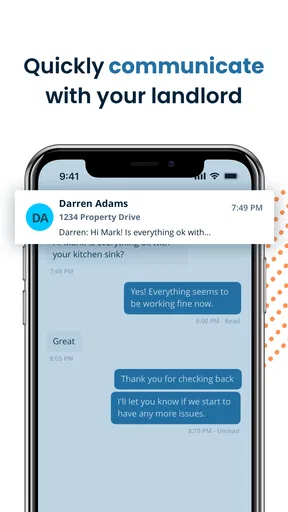
Communication with landlords through the app is seamless. There are built-in messaging features that allow you to chat directly with your landlord. You can discuss the nitty-gritty details or ask questions without having to resort to lengthy email threads or phone calls. It’s all about keeping things simple and straightforward.
A practical application routine
For someone viewing several homes, I would use a separate note alongside each application for details that are easy to confuse: the viewing time, a question to ask, and the next date to follow up. The app may help keep the application activity in one place, but a personal checklist makes it easier to compare properties on your own terms. That matters when two landlords respond close together and you need to remember which home had a particular condition or conversation.
Imagine finishing a viewing during a lunch break, then needing to apply before returning to work. A sensible routine is to check the property identity, review the application details, submit, and then record what you still need to ask. Later, check the relevant conversation channel rather than assuming every reply will arrive in one place. This approach uses the app to reduce repeated work without making it the only record you rely on.
When it helps—and when another route is better
Compared with managing everything through scattered email threads, paper forms, and phone notes, a renter-focused app can give a search a more orderly center. Reusing an application is particularly appealing if you are actively considering multiple properties. But a spreadsheet or a basic notes app may be better for comparing rent, commute, lease terms, and viewing impressions side by side, especially if you want a custom layout or do not want to enter the same information into another service.
I would skip relying on TurboTenant as my main tool if my landlord does not use its renter workflow, if I prefer keeping sensitive rental details entirely in my own files, or if I only need a one-off note about a repair. In those cases, direct email, a phone call, or a private document may be more straightforward. The right choice depends on whether the people involved actually use the same process—not on how tidy an app looks in theory.
The Payment Process
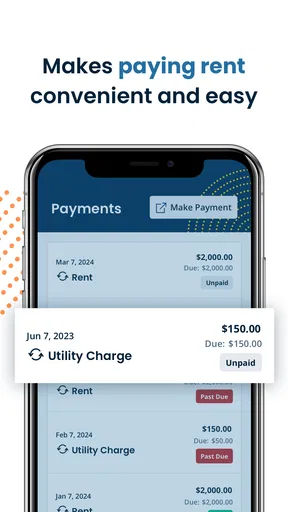
Nobody loves dealing with rent payments, but TurboTenant makes it a bit less painful. The app allows you to pay your rent directly through it, and you can even set up automatic payments so you never miss a due date. Plus, you can keep track of all your payment history in one place. It’s like having your own little financial assistant keeping things organized for you.
Keeping money records clear
Even if you use an in-app payment option, I would keep the lease and any written payment instructions easy to find, then check that the payment is associated with the correct tenancy before proceeding. Automatic payments can save a repeated task, but they are not a substitute for noticing a changed amount or confirming that your payment arrangement still matches your agreement. A calendar reminder to review the next payment is a cautious middle ground if you are not comfortable with automation.
For a shared household, decide who is responsible for checking that rent has been handled and where the confirmation will be kept. The app may help an individual renter follow payment activity, but household coordination is still a human task. Agreeing on a clear routine can prevent two people from assuming the other has taken care of it.
Keeping Track of Maintenance
If you’re anything like me, remembering to report maintenance issues can sometimes slip your mind. TurboTenant has a feature for that too. You can easily report any maintenance issues through the app, and it keeps a record of all your requests. You’ll even get updates on the status of your repair requests, so you’re never left wondering.
Recovering when a step goes missing
If an application, message, payment, or repair request does not appear to have gone through, I would first check the relevant screen and the communication channel connected to that task. Confirm that the information is correct and that the action was actually completed before sending it again. Repeating a submission without checking can create duplicate conversations or confusion for the landlord. If the app still does not show the expected result, contact the landlord through the channel already used for the rental and explain what you attempted.
For maintenance, a short, factual report is more useful than a long account written from memory later. Note what is affected, when you noticed it, and whether the issue has changed; keep any relevant photos or details in your own records as well. If the problem is urgent or could cause immediate harm, do not wait for an app status update before using the appropriate direct contact method. An app’s convenience should not delay a time-sensitive request.
When the app may not be the cause
A missed update can come from a landlord’s response time, a different communication channel, or an incomplete step—not necessarily a technical fault. I would check whether I am looking at the right property and conversation, then verify that my contact details are accessible. If a task is time-sensitive, a polite direct follow-up is often more useful than repeatedly refreshing a screen. Keep a record of what you sent and when, so you can explain the situation clearly without relying on memory.
It is also worth separating app convenience from rental decisions. A screening result or an organized application can help you prepare, but it does not tell you whether a property suits your budget, whether a lease clause is acceptable, or whether a landlord has answered every question. Read the actual agreement, compare the costs that matter to you, and ask for clarification in writing when something is unclear. That extra care is especially important when you are applying quickly under pressure.
Security and Privacy
In this digital age, security and privacy are big concerns, and TurboTenant takes this seriously. They use secure encryption methods to protect your data, ensuring that your personal information is safe. It’s nice to know that the app has your back when it comes to security.
Who will get the most from it
I see the strongest fit for renters who are actively searching, want to reuse application details, and expect to handle several parts of the rental process from a phone. It can also suit someone who prefers keeping landlord conversations, payment activity, and maintenance follow-up connected to a renter workflow rather than building a system from scratch. The free price makes it easier to try, though I would still decide what information I am comfortable entering and keep important documents under my own control.
It is less compelling for someone who has a stable tenancy and rarely needs to contact a landlord, or for renters whose property manager relies on another portal. It may also be a poor match if you want a fully custom property-comparison tool or prefer not to manage rental details through an app. In those situations, a calendar, spreadsheet, or direct communication may be simpler and easier to adapt.
Final Thoughts
In conclusion, TurboTenant for Renters is a pretty sweet tool for anyone navigating the rental market. It simplifies the process, cuts down on paperwork, and keeps everything you need in one convenient location. If you’re in the market for a new place or just want to streamline your renting experience, give this app a whirl. It might just be the game-changer you didn’t know you needed.
And hey, if you’re ready to dive in, you can easily download TurboTenant from the App Store or Google Play. Happy renting!
Pros
- User-friendly interface for easy navigation.
- Comprehensive property listings with details.
- Secure messaging system with landlords.
- Access to tenant screening tools.
- Mobile alerts for new listings and updates.
Cons
- Limited to certain geographic locations.
- Occasional app crashes reported by users.
- Some features require in-app purchases.
- Limited customization of search filters.
- Requires internet for most functionalities.
FAQs for TurboTenant for Renters
What features does TurboTenant offer for renters?
TurboTenant provides renters with a comprehensive platform to streamline the rental process. Features include the ability to apply for multiple properties with one application, pay rent online, manage maintenance requests, and communicate directly with landlords. These tools are designed to make renting more efficient and user-friendly.
Is TurboTenant free for renters to use?
Yes, TurboTenant is free for renters. The platform allows you to apply for properties and manage your rental experience without any fees. However, be aware that there might be costs associated with background checks or credit reports, as these are sometimes required by landlords.
How secure is my personal information on TurboTenant?
TurboTenant prioritizes the security of your personal information. The platform uses encryption and other security measures to protect your data. Additionally, TurboTenant follows industry best practices to ensure that your sensitive information, such as social security numbers and financial details, remains confidential and secure.
Can I communicate with my landlord through TurboTenant?
Yes, TurboTenant facilitates direct communication between renters and landlords. The app provides a messaging feature that allows you to discuss lease terms, ask questions, and handle maintenance requests efficiently. This ensures a clear and documented line of communication, which can be beneficial for both parties.
How does TurboTenant handle maintenance requests?
Through TurboTenant, renters can easily submit maintenance requests to their landlords. The platform allows you to describe the issue, attach photos, and track the progress of your request. This streamlined process ensures that maintenance issues are addressed promptly and efficiently, improving the overall rental experience.


